NovelWriter update 26.2
Last updated: 59 minutes ago
Intro
I got a notification this morning that novelWriter released an upgrade this morning. Naturally I want to check out the new (features)[https://novelwriter.io/releases/release_26_2.html]. I will install and update my projects so that you don't have to (I'm not actually going to update my project, I am going to duplicate it.)
Installation
They note that they are bringing back their MacOS support, but it has been delayed. They also note that the build is not in the Fedora repos yet (boohoo for me). But they have an AppImage, so I am going to use that to keep my current installation and project the way it is.
AppImage is super easy to use; Download the image, set to executable, and run. Boom! New NovelWriter.
Writing Goals
This update has writing goals that you can set now:
"You can now set writing goals for your project and track your progress towards them on a daily basis. Progress is shown as colour-coded progress bars in the status bar of the user interface. The daily progress resets automatically when you start writing on a new day. Only content in novel root folders is counted, and if your project has multiple novel folders, you can exclude some of them from the count in the project settings."
That doesn't include any instructions, but it hints that we should look in the Project settings. And that is exactly where I found it. Can select to track work done in any or all novel roots. Can specify daily and project word goals. Pretty slick.
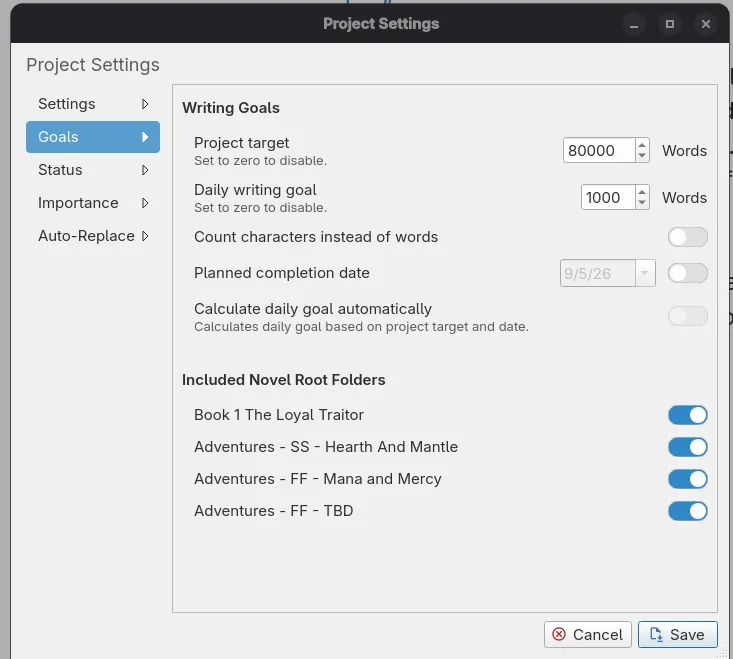 Figure 1: The Goal settings panel
Near the bottom of the app window are two percentage bars to show you the progress on daily and project goals.
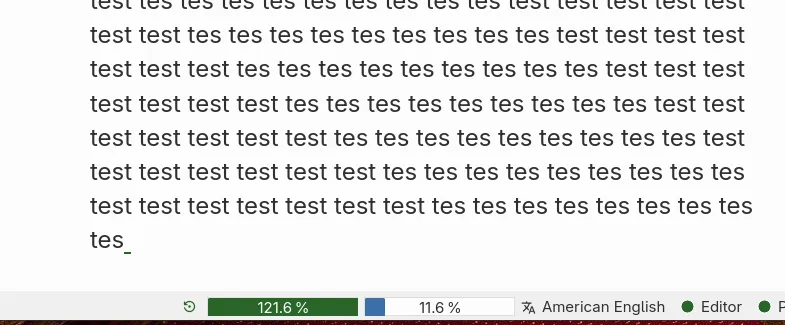 Figure 2: The Tracking bars at the bottom of the window.
Improved Project Search
The next thing the release notes list is a better project search (glad I found this recently).
"The project search tool now has a collapsible filter panel below the search box, letting you narrow your search results by text content, document type, and root folder. In addition, when you search in the editor, all matches for your search term in the open document are now highlighted at once, not just the one currently selected, making it much easier to see where else the term appears."
This one is fairly straight forward and super slick. ctrl+shift+f to open the project search pane. There is a dropdown with a few toggles for what to search through.
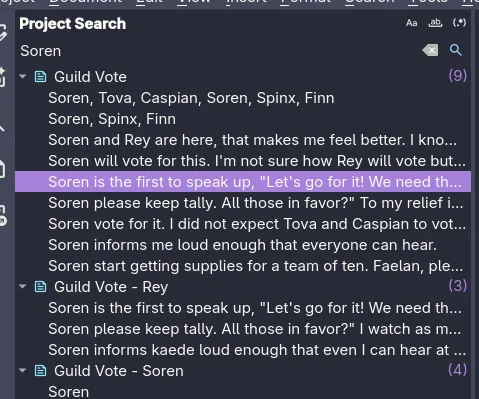
Figure 3: The old project search
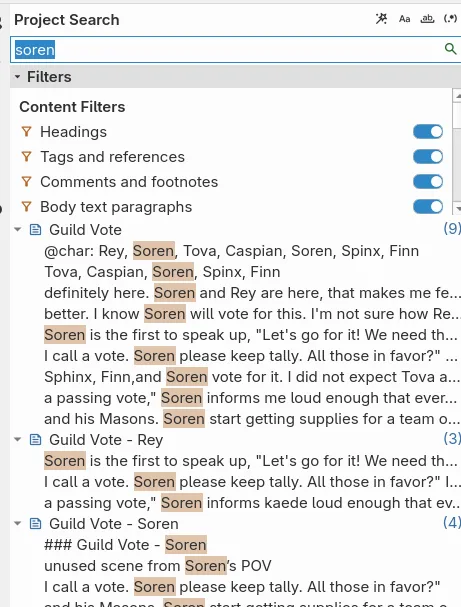 SorenSearchPic_new
Figure 4: The new project search with the toggles
Various Other Changes
- novelWriter can now export your manuscript as an EPUB 3 file, alongside the existing output formats.
- You can insert a horizontal rule across the page in your manuscript by using four hyphens (----) as the heading format.
- The page break marker shown in the manuscript preview has changed from a solid block of text to a dashed line, and a font kerning issue when printing the preview on Windows has been fixed.
- Manuscript Build Settings has a new option to enable or disable justify-expansion of lines with manual line breaks, now also available for the Open Document and Word Document formats.
- You can now zoom the text in the editor and viewer in and out using the standard zoom shortcuts.
- A new setting in Preferences lets you adjust the line height of the text in the editor and viewer.
- Hovering over a tag in the editor or viewer now shows a hover card with buttons to quickly open the referenced document for editing or viewing.
- You can now paste rich text (HTML) into the editor, and it will be converted to novelWriter style markup. Copying text out of the editor still produces plain text as before.
- A new format checker highlights trailing spaces at the end of lines, in addition to the existing check for multiple spaces between words.
- The editor’s auto-complete menu has been rewritten to use a more native look, with improved keyboard handling: arrow keys navigate the list, Left and Escape close it, and Tab, Enter, Return, and Right accept the highlighted entry.
- The symbol auto-replace feature can now also be used in the editor’s search and replace boxes, the project search box, and the header format field in Manuscript Build Settings, and can be toggled on or off independently in each.
- Toggle buttons, such as those in the search tools, are now easier to see when active, using a new theme colour. Search matches in the editor and project search results also use a new highlight colour, which now updates immediately when you switch themes.
- Tooltips and scrollbars once again correctly match your selected colour theme, after a compatibility issue with newer versions of Qt had caused them to use the wrong colours. Some issues with how long labels are handled in switches, and in the quick link and header navigation menus, have also been fixed.
- The automatic backup feature has a new setting for how often backups are made. You can set backups to run per session as before, or limit them to at most once per day, week, or month, in which case the previous backup for that period is overwritten instead of a new one being created every time.
- You can now recursively set the active or inactive state of all documents under a folder from the project tree’s right-click menu.
- The Tools menu now shows a checkbox for the active project’s spell check language, and the spell checker re-runs automatically whenever you change it.
- The item details panel below the project tree and novel view can now be collapsed.
- Performance of the spell checker has been substantially improved, and very long paragraphs are now skipped by syntax highlighting and spell checking to keep large documents responsive.
I like the new "on hover tooltip" for references and being able to build into epub.
Conclusion
Some great additions to the app. I am excited to have them come into the Fedora repos so that I can update my primary novelWriter.
Join me at:
Discord
Mastadon
Twitter
Email