NovelWriter Tricks
Last updated: 1 month, 2 weeks ago
Intro
I have been working on getting my short story done and have been spending a lot of time trying to figure out how to use NovelWriter to the best of my ability. I have to say it has not been easy. There is a distinct lack of information on the internet regarding this project. The documentation is good, but I want a solid youtube tutorial or some user experience blogs. In the words of Thanos, "Fine, I'll do it myself."
Searchability
This one may be obvious to some, and is also probably really easy to find. I was using ctrl+f to search for words, but this was only searching in one document. Not very helpful. I want to find all instances of a character talking because I need to change his speech patterns.
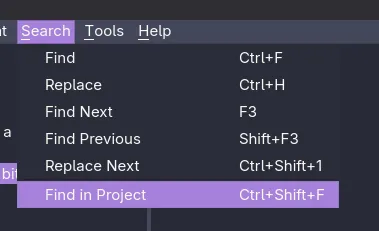
I didn't find a feature like this in docs or in the app (though I admittedly didn't look hard enough), and I had to ask AI. The Keybind for it is ctrl+shift+f and that will search your entire project.
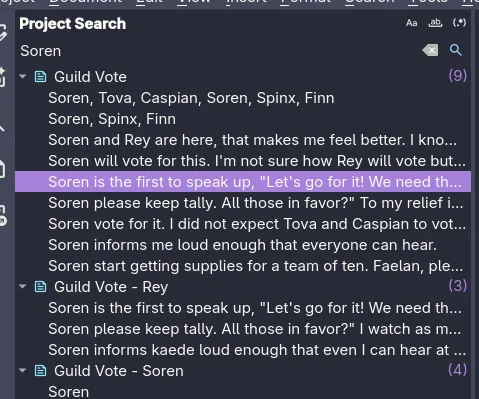
Also, I have since found the project wide search in both the docs and the app:
Comment Tracking
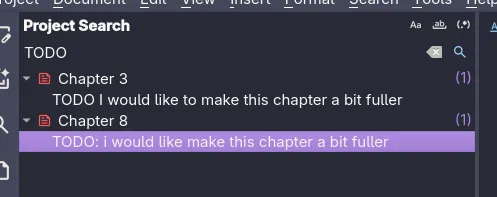
Coming from a programming background, I like to comment on my work, but more importantly, I like to create TODO comments. In VS Code there is an extension that shows all my TODO comments throughout my project. I was looking for a way to do this in NovelWriter: There isn't one. I was ready to throw down and write a C++ app to rip through my project and output all my TODOs and their locations. But now that I have found the project wide search feature, I can just use that.
So now I can sprinkle TODO comments throughout my work:
% TODO this is a todo comment
and use ctrl+shift+f to search for TODO and get all of my TODO comments in a nice list view.
Tags
This topic can probably be its own post, but I'll try to get a general feeling of it here. Here is the (doc page)[https://novelwriter.io/docs/usage/tags_and_references.html] for all of the tags and references. There is a lot of good info there for each tag individually but I feel like it fails to get the basic premise across.
Every entity needs to be "Tagged" before you can reference it in another entity. For example every character needs:
@tag: Soren
Then in a scene you can use another tag to reference to that character; such as pov or char:
@pov: Soren
But it's not just characters and scenes, you give locations a location tag. For instance I have a city note tagged as @tag: Chikoreem and then I have another location tagged as @tag: Guild Hall with a @location: Chikoreem because the guild hall is in the city of chikoreem and will never move (most likely).
And then I just discovered today that there is plotline and timeline tagging as well. So now I have to go build those up so I can use those references in my scenes.
Also, when you assign a reference to something, like a scene, you can ctrl+click on that reference and will open a side by side of the reference and what you are currently working on.
Conclusion
Maybe for some people this is basic information, but it seems like there is no one out there working on putting this information out there in an easy and user-friendly way. I will continue to try to post more information as I come across it. And always feel free to reach out to me on socials, email, or join my discord and come hang out with us.
Join me at:
Discord
Mastadon
Twitter
Email